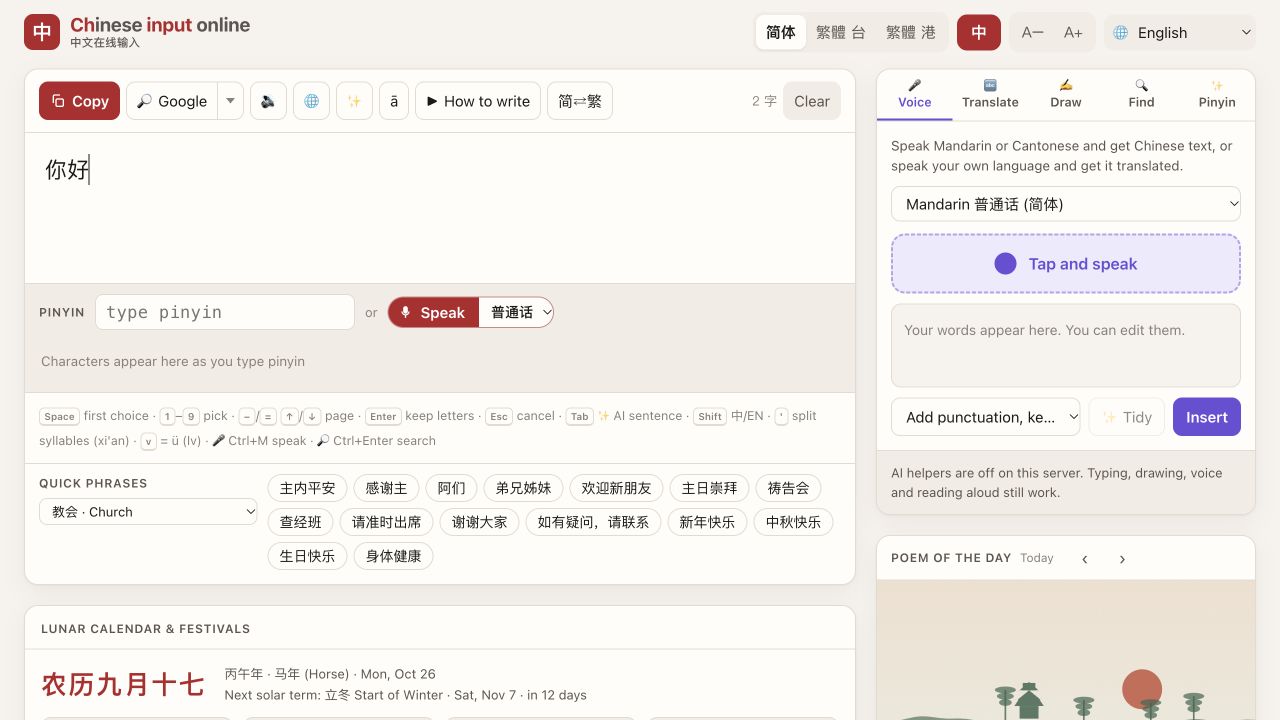
Type Chinese church notices and song titles online
A shared church or school computer may have no Chinese input installed. You can prepare headings in Chinput and copy them into your slide editor or notice.
Insert service headings
Choose Church in the scene menu. The ready-made buttons include 主日崇拜 (Sunday service), 祷告会 (prayer meeting), 查经班 (Bible study), 欢迎新朋友 (Welcome, newcomers) and 主内平安 (Peace in the Lord). Click one to insert it, add your details and copy it into the slide.
For words not on a button, try Pinyin:
诗歌 — shige — hymn/song
敬拜 — jingbai — worship
祷告 — daogao — prayer
团契 — tuanqi — fellowship
If you recognise a character in a song title but do not know its Pinyin, open Draw, copy its strokes, and choose the matching character. Compare the final title with your congregation's song list; similar pronunciations can give different characters.
Choose Simplified, Traditional Taiwan or Traditional Hong Kong as appropriate, then proofread after conversion. The ā control can display Pinyin above characters for learners. Copy the completed text to your presentation and check line breaks there. For complete lyrics, use your own, public-domain or properly licensed text.
Three ways to enter the text
- Pinyin: type one word or short phrase, check the candidates, then press Space for the first choice or its displayed number for another. If a phrase is wrong, split it into smaller parts. Full Pinyin is easier to check when starting out.
- Handwriting: open Draw and draw one character with a mouse, trackpad or touch screen, lifting between strokes. Select the correct local matching result. Undo removes the last stroke; Clear starts again. This is handwriting matching, not photo scanning.
- Quick phrases: choose the relevant scene below the editor. Its vocabulary gets priority and its phrase buttons insert ready-made text. Edit the result, click Copy, then paste where you need it.
Core Pinyin and handwriting need no account or input-method installation. Optional AI translation is currently disabled. Mainland China access has not been verified; save essential text beforehand.